EO Browser - you are not authorized to perform this action

  • April 17, 2024
  • 10 replies
  • 0 views

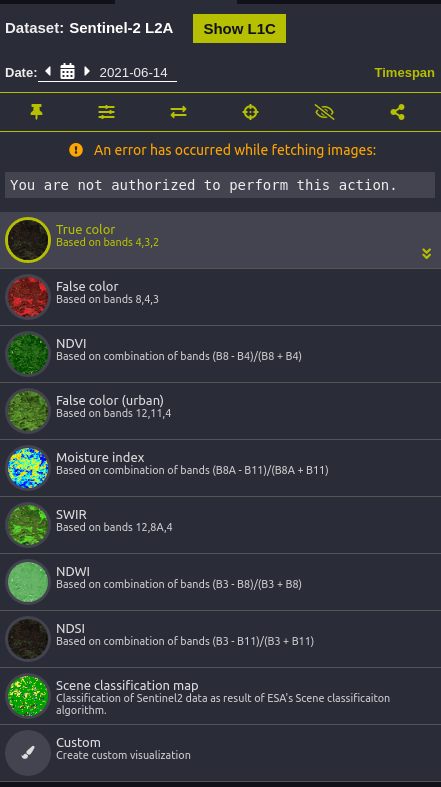
I have seen the “you are not authorized to perform this action” a couple of times in the EO browser with Sentinel 1 and Sentinel 2 data sources. I am logged in when this happens. As soon as I log out, it works just fine.

10 replies

Hi, thank you for your response.

  1. I am using default configuration
  2. The layers are not visualized when I am logged in. As soon as I log out they are visualized
  3. The error randomly appears so I couldn’t recreate it with other collections and themes.

One thing I noticed was this:
I am logged in, I get the error message and the data is not visualized. I log out, the data is visualized. Then I log back and then the error disappears. For what it is worth I am using Brave as my browser.


Hi!
This is not intended behaviour, and to be able to figure it out, we would kindly ask you for the following information:

  • Are you using your own configuration or the default one? It seems like you’re using a default Sentinel-2 L2A configuration, but just to be sure.
  • Please check if the layers are visualized regardless of the error message, and if yes, check if all, or only some are visualized.
  • After getting this error message, check if other collections and themes work. Try out e.g. Sentinel-1 or the Vegetation theme.

Thank you!

We’re working on a solution. I will let you know once we have fixed it.

Best regards
Pontus


Hi @pontus.berg ,

It happens immediately after I sign in.

Best

Chinmay


Hello!

Does this problem occur immediately after you sign in? Or have you left the EO Browser tab inactive for a while when it happens?

Best regards
Pontus


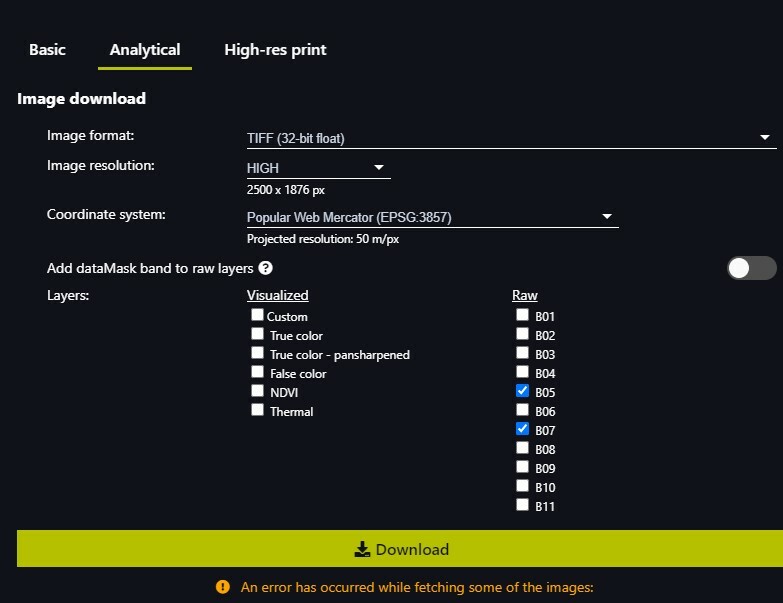
Yes - I have been getting the same message - I can download kmzs but not georeferenced tiffs


I was planning on downloading some custom NIR SWIR images for wildfire mapping and creating some dNBR using the index function - but kept getting this message
EO browser is awesome!!! Owen

Thanks for waiting. We have solved the issue now. Let me know if you still experience any issues.

// Pontus


Hi Pontus
Thankyou for responding - today I went back and started trying to dowload some 8 and 32 bit TIFFs of indexes and custom composites. I started collecting URLs where the error message occurred. The same thing happened as in my original message . I then tried loading some simple preset browser images and they downloaded - I then went and tried the more complex images and some of the URLs I’d collected and guess what - they downloaded fine!!! So I don’t understand why. I then spent the next hour making coposites with custom scripts and creating indexes with both landsat and sentinel and there was no issue - everything worked perfectly
So I’m a happy camper again and am at a loss to explain why
The problem appears intermittent
I’ve been using Google Chrome as a browser and have a high latency satellite internet connection - but I’ve never seen the message before
Here are the URLs that I had trouble with but now work
best regards and thankyou
Owen

apps.sentinel-hub.com 0d605cf007e70fef63de75e75f6672e960701301.jpg

Sentinel-hub EO-Browser3

Sentinel-2 L1C imagery taken on October 31, 2020

apps.sentinel-hub.com 0d605cf007e70fef63de75e75f6672e960701301.jpg

Sentinel-hub EO-Browser3

Imagery taken on October 30, 2020


Hello!

Could you share what your URL looks like when you’re trying to download the tiffs? 🙂

Best regards
Pontus


Thank you for the URL’s and the detailed explanation!

We found the problem and fixed it. If you experience any further problems, let me know. 🙂

Best regards
Pontus