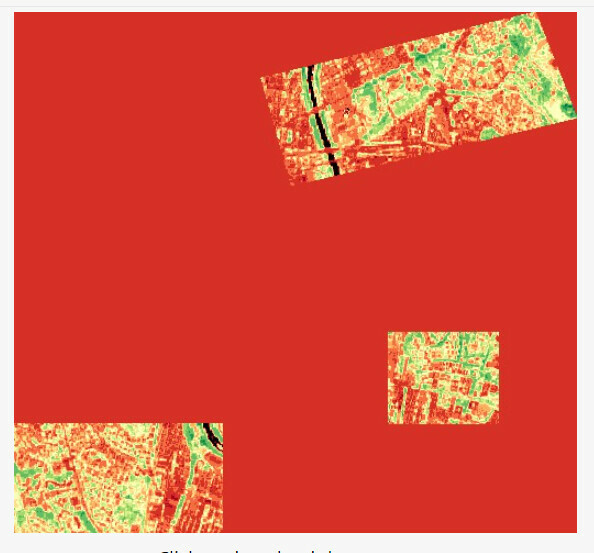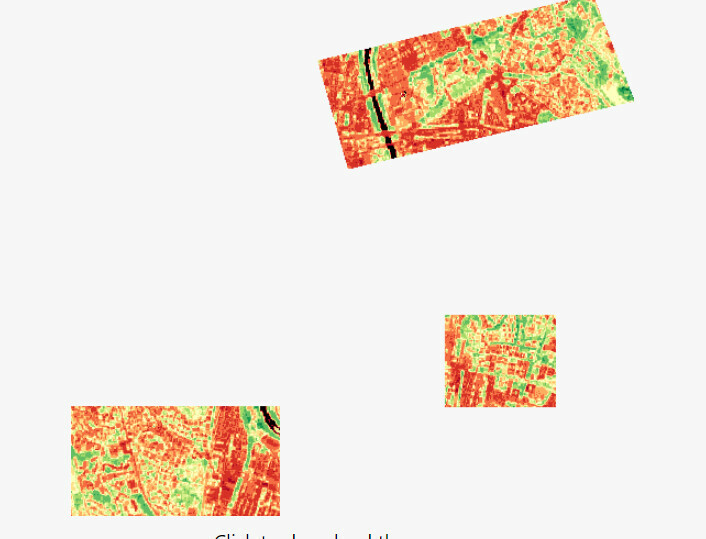
Hello everyone, I hope you’re all doing well.
I’m currently working on sending a request that involves multiple polygons. However, I’m encountering an issue where there’s a red area appearing between the polygons, when visualizing the NDVI index
Here’s my script :
//VERSION=3

function setup() {
  return {
    input: ["B04", "B08", "SCL", "dataMask"],
    output: [
      { id: "default", bands: 4 },
      { id: "index", bands: 1, sampleType: "FLOAT32" },
      { id: "eobrowserStats", bands: 2, sampleType: "FLOAT32" },
      { id: "dataMask", bands: 1 },
    ],
  };
}

function evaluatePixel(samples) {
  let val = index(samples.B08, samples.B04);
  let imgVals = null;

  const indexVal = samples.dataMask === 1 ? val : NaN;

  if (val < -0.5) imgVals = [0.05, 0.05, 0.05, samples.dataMask];
  else if (val < -0.2) imgVals = [0.75, 0.75, 0.75, samples.dataMask];
  else if (val < -0.1) imgVals = [0.86, 0.86, 0.86, samples.dataMask];
  else if (val < 0) imgVals = [0.92, 0.92, 0.92, samples.dataMask];
  else if (val < 0.025) imgVals = [1, 0.98, 0.8, samples.dataMask];
  else if (val < 0.05) imgVals = [0.93, 0.91, 0.71, samples.dataMask];
  else if (val < 0.075) imgVals = [0.87, 0.85, 0.61, samples.dataMask];
  else if (val < 0.1) imgVals = [0.8, 0.78, 0.51, samples.dataMask];
  else if (val < 0.125) imgVals = [0.74, 0.72, 0.42, samples.dataMask];
  else if (val < 0.15) imgVals = [0.69, 0.76, 0.38, samples.dataMask];
  else if (val < 0.175) imgVals = [0.64, 0.8, 0.35, samples.dataMask];
  else if (val < 0.2) imgVals = [0.57, 0.75, 0.32, samples.dataMask];
  else if (val < 0.25) imgVals = [0.5, 0.7, 0.28, samples.dataMask];
  else if (val < 0.3) imgVals = [0.44, 0.64, 0.25, samples.dataMask];
  else if (val < 0.35) imgVals = [0.38, 0.59, 0.21, samples.dataMask];
  else if (val < 0.4) imgVals = [0.31, 0.54, 0.18, samples.dataMask];
  else if (val < 0.45) imgVals = [0.25, 0.49, 0.14, samples.dataMask];
  else if (val < 0.5) imgVals = [0.19, 0.43, 0.11, samples.dataMask];
  else if (val < 0.55) imgVals = [0.13, 0.38, 0.07, samples.dataMask];
  else if (val < 0.6) imgVals = [0.06, 0.33, 0.04, samples.dataMask];
  else imgVals = [0, 0.27, 0, samples.dataMask];

  return {
    default: imgVals,
    index: [indexVal],
    eobrowserStats: [val, isCloud(samples.SCL) ? 1 : 0],
    dataMask: [samples.dataMask],
  };
}

function isCloud(scl) {
  if (scl == 3) {
    // SC_CLOUD_SHADOW
    return false;
  } else if (scl == 9) {
    // SC_CLOUD_HIGH_PROBA
    return true;
  } else if (scl == 8) {
    // SC_CLOUD_MEDIUM_PROBA
    return true;
  } else if (scl == 7) {
    // SC_CLOUD_LOW_PROBA
    return false;
  } else if (scl == 10) {
    // SC_THIN_CIRRUS
    return true;
  } else if (scl == 11) {
    // SC_SNOW_ICE
    return false;
  } else if (scl == 1) {
    // SC_SATURATED_DEFECTIVE
    return false;
  } else if (scl == 2) {
    // SC_DARK_FEATURE_SHADOW
    return false;
  }
  return false;
}