
Sentinel-2 Scene classification map

  • April 17, 2024
  • 7 replies
  • 0 views

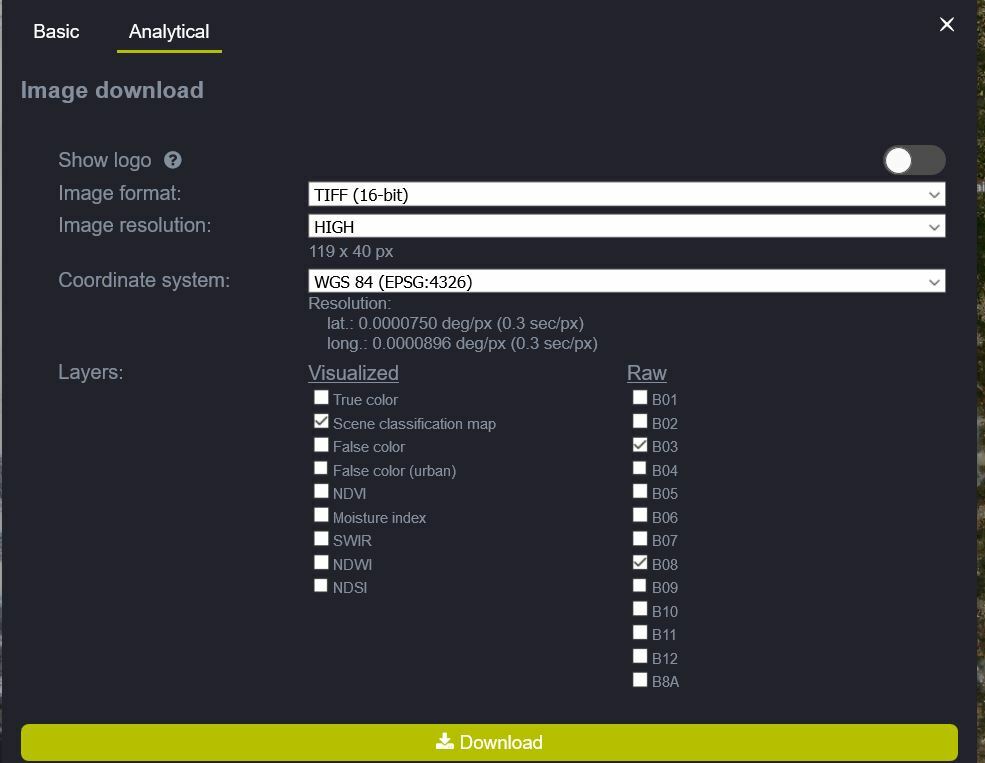
I’ve downloaded Scene classification map products of Sentinel-2 L2A (as GeoTiff, Popular Web Mercator)

The Scene classification map had 3 bands, holding float numbers.
However, this product should have only one band, where each pixel is an integer value representing the land cover class.
Can someone explain this discrepancy?
7 replies

I’m not sure what do you mean by “visualized” layer.

I’v downloaded other bands with the Scene classification map, and they are as expected.

Also, why would the Scene classification map have 3 bands? instead of 1 band.


I imagine you are downloading “visualised” layer.
See the lonk below describing a similar isssue.
https://www.sentinel-hub.com/faq/how-do-i-get-actual-ndvi-values

You will have to configure your layer so that you “normalise” it, eg that max SCL value corresponds fo 1.


I know the classification layer is discrete.
I download this layer via the UI, I did not write any code, I just checked the box next to it.

This is what I do, and then click download:


What is your configuration for this layer?
If you set it as
return[SCL/11]
You should get one band values, which you then have to map back to classifier.
The classification layer is discrete, unlike the other bands


OK, now I see what did you mean by “visualize layer”. So if I understand you correctly, I cannot download the NDVI layer as I expected (as “scientific” layer with values 0-1), since I can only download it for visualization? In order to download it as scientific layer I’ll have to create my own NDVI layer and then download it?


As you can see, they are in the visuallised column…


Yes, EO Browser was not designed for such cases.
We would recommend you use Sentinel Hub service directly for that, either through OGC services, proprietary API or Python packages.